
Calculating stock on ground volumes from a photogrammetric survey is a relatively easy task when:
- good stock management practices are adhered to,
- the UAV undertaking flight capture has an uninterrupted view of the entire stockpile,
- the Estimator has access to quality software applications designed to carry out the volume estimate,
- the Estimator demonstrates a high level of competency in the volume calculation methodologies available,
- the Estimator understands how stock on ground behaves.
Software development has seen the advent of AI controlled processes. Within Propeller automatic identification of stockpiles from a photogrammetric model is possible. Yet, machine learning has a way to go. with a competent Estimator still required to:
- Firstly, assess the model before use, determining its adequacy for stock on ground estimation,
- Secondly, edit the model where necessary to remove features that will adversely impact any choice of volume calculation method applied,
- Third, assign the most appropriate volume calculation method to achieve precise volume estimates.
The fact is, when sites are land constrained, stockpile management can be impaired. Often on smaller sites stockpiles end up abutting other non-stock features, with no unequivocal stock boundary (toe) on all sides. Or on long established sites stockpiles located near trees, portions of the pile can be obscured beneath overhanging canopy. These are just two examples of features where AI generated stock volumes fail. One feature results in under estimation and the other over estimating. Machine learning is not capable of calculating correct stock on ground volumes autonomously in all cases.
The ability of the Estimator to clearly visualise factors influencing the photogrammetric survey is crucial to solving volume calculation problems. Let’s look at how the estimation of stock volume can be improved in two cases.
Case 1: The stockpile has an obscured view due to overhanging canopy (select cascade for more information)
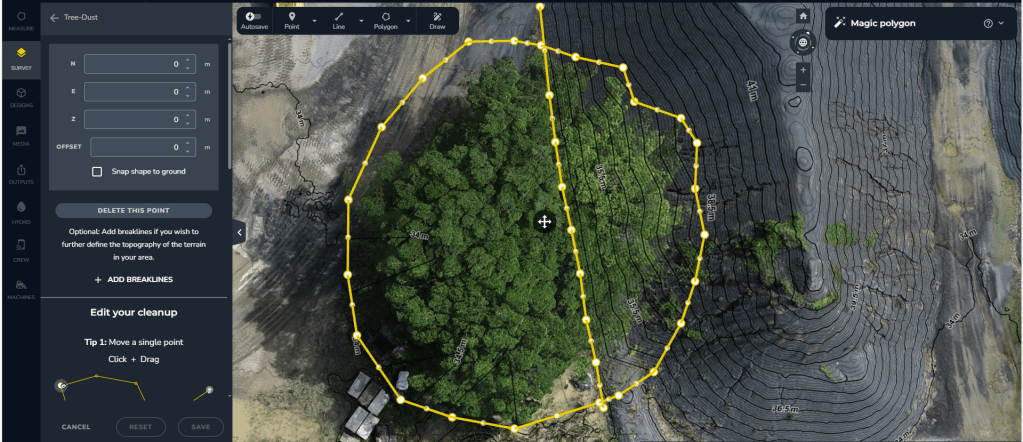
In this example, we have a stockpile partially obscured by overhanging canopy from a tree.

During data processing AI filtering algorithms can be applied. A level can be assigned that flattens vegetated areas. This algorithm attempts to assign the bare earth value to the model. The filtering response is imperfect.

It is because of scenarios like this that LiDAR comes into its own superseding photogrammetry. Nonetheless, LiDAR comes with comparably higher equipment, capture and processing costs. So, what do you do if:
- you can’t justify the increased costs of LiDAR,
- you can’t clear overhanging vegetation due to constraints,
- yet you need an accurate representation of the stockpile surface.
The answer is simple, apply Terrain Cleanups. This requires learned skills by the Estimator as it is a manually operated tool. It enables an experienced Estimator to replace part of the model with a Delauney triangulation.
A competent Estimator will interpret the position for both the unaffected stock, bare earth surface and the stockpile toe. Their skill enables the replacement of the canopy affected model with a triangulation. Along with this they assign the position of a slope change (hidden stockpile toe), thereby correcting the stockpile shape.

When applied properly, Terrain Cleanup enables a superior representation of stockpile shape to be generated.
Sites with good GCP management practices can copy the Terrain Cleanup edit from one survey date to another. This allows the adjustment to be maintained over an extended period of time with minimal technical load to personnel.
The same technique can be applied on invasive weed infestation over long term portions of a stockpile. Some cases require a breakline depending on the affected area.
The key to developing a good Delauney triangulation Terrain Cleanup is:
- pick boundary points on the clean stockpile surface and bare earth surrounds, thereby setting accurate elevation of the boundary,
- create realistic breaklines representing where slope changes on the stockpile surface occur, ensuring the end points of the breakline are on true ground and extend beyond the boundary extent,
- readjust the elevations of the points within the breakline to height values that follow the trend between end member points.
Case 2: The stockpile engulfs the edge of a bundwall and is hard up against a bench (select cascade for more information)
What actions does the Estimator take when a stockpile has spread onto a bundwall? Over time, this has buried a part of the feature. Standard volume calculation techniques typically don’t cover this case. They can result in either an underestimation or overestimation of the stock volume.

To date, the only reliable way to calculate the volume for conjoined features was to have a preexisting survey. One survey had to have the stockpile absent. This method allows the volume to be accurately calculated by the difference between the two surfaces. Often, availability of such a surface isn’t the reality.
So, if the Estimator can’t access a prior survey without stock on ground, do they risk the estimate? Not so if they apply the Terrain Cleanup function with a more novel approach. Use the function to create a design surface from the survey and then utilise this in the volume calculation.
The Estimator can create an empty floor by generating a boundary outside the stockpile and over the buried features. Breaklines are also generated. These should mimic the buried position of the bench toe and/or bundwall crest. Secondary editing is required, setting breakline point elevations to the correct height. Breakline orientation can be interpreted from the trend of exposed bundwall and toe features. Once created, the completed terrain edit will give the appearance that all the stockpile has been removed. If you have multiple stockpiles with this issue, then repeat the function as many times as required over affected areas.
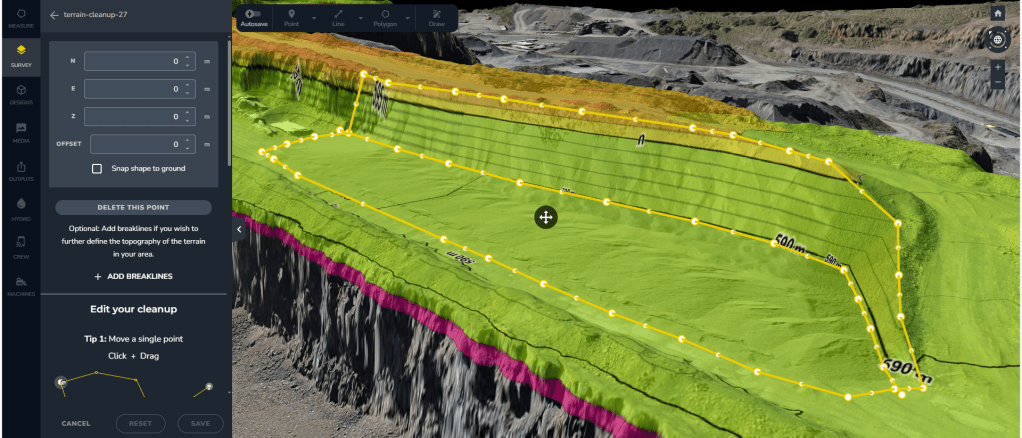
Once Terrain Cleanups are completed, follow these steps:
- Create a broader polygon around the edited areas.
- Export the polygon area as a DXF model (with 3D faces).
- Disable the cleanups and reestablish the stock on ground position to its current surveyed form.
- Import the DXF back into the survey as a design surface.
- Utilise the imported DXF design surface as the Surface-To reference for volume calculations.
The Terrain Cleanup function within Propeller is a powerful tool. Estimators should take the time to learn how to effectively use it. Future upgrades to software functionality should include breakline creation as an enhancement to the Custom Surface volume calculation method.


 David Arnott & Assoc.
Leave a comment